
Automation
Prospecta
The challenge
Prospect with your own data, without outsourcing the playbook to an off-the-shelf tool
Apollo, PhantomBuster and LinkedIn Helper solve part of the problem — but they hand everyone the same playbook, know nothing about each operation's ICP, and charge for it. The challenge was building personalized prospecting on top of proprietary data, while respecting the limits that keep the account alive.
Off-the-shelf tools don't know your ICP
Automation platforms work with generic lists and cadences. The right audience is defined by whoever knows the business — and that doesn't fit inside a ready-made filter.
Proprietary data gets left out
What the company already knows about its clients — segment, the role that decides, the language that works — never makes it into a closed tool.
Crossing the limit costs you the account
High volume and robotic behavior get profiles restricted. Any serious automation needs a daily cap, human pacing and an automatic brake.
The solution
FlowCode built its own engine: an RPA that opens LinkedIn the way a person would, and runs exactly the flow the team designed in the panel.
- 1
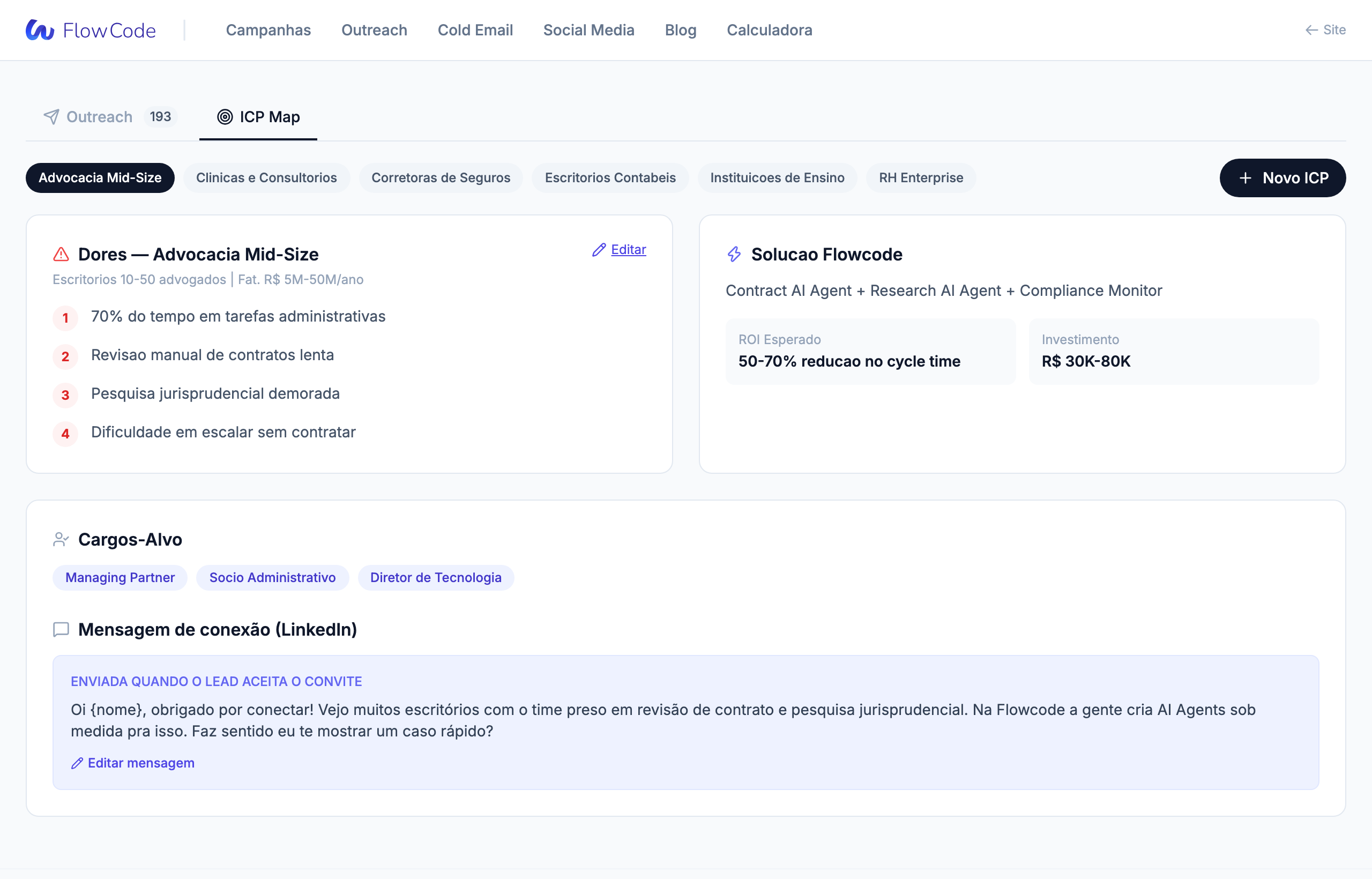
You define the ICP and job titles in the panel
Segment, job title keywords and the message for that audience — all set up in a dedicated screen, without touching code. The agent reads it straight from the database on every run.
- 2
The RPA engine navigates like a person
Instead of hitting an API, the automation drives a real browser: it finds ICP profiles, with randomized pauses between actions and a daily invite cap — which keeps the behavior within what the platform tolerates.
- 3
The configured flow runs step by step
Connect, like a recent post, follow, and when to send the message: every step is configurable. The automation knows exactly what to do at each stage, because the team designed the playbook.
- 4
The CRM is enriched and the team gets the results
Every contact lands in the CRM with an updated status. At the end of each run, an email summarizes what happened — and if something breaks (captcha, error), the agent stops on its own and reports instead of pushing through.
The stack
Custom RPA engine
A real browser driven by code — not an API, not a third-party extension.
ICP panel
Segments, job titles and messages set up by the team, with no developer required.
Custom CRM
Contacts, statuses and templates in one database, populated automatically.
Email reporting
Results from every run, plus an immediate alert when something breaks.
Get in touch
Tell us what you need to build. We reply with a possible path — not an automated form response.
- Reply within 1 business dayA person reads what you wrote and answers. No triage bot.
- No-strings conversationThe first call is to understand the problem. We only talk pricing when it makes sense.
- You talk to who builds itThe person answering is on the team that will work on your project.